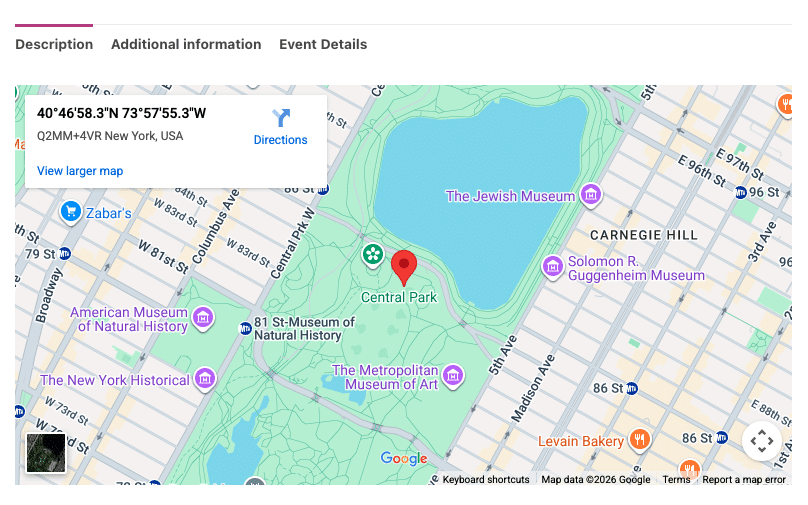

Το FooEvents σας επιτρέπει να εμφανίζετε χάρτες στις εκδηλώσεις/προϊόντα σας χρησιμοποιώντας τους χάρτες Google. Μπορείτε να επιλέξετε από δύο μεθόδους ενσωμάτωσης χαρτών.
Επιλογή μεθόδου ενσωμάτωσης:
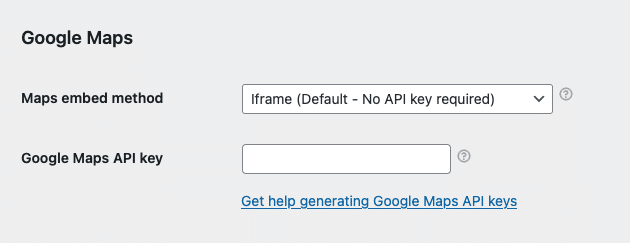
- Πλοηγηθείτε στο FooEvents > Ρυθμίσεις > Ενσωμάτωση > Χάρτες Google
- Επιλέξτε ένα Μέθοδος ενσωμάτωσης χαρτών:
- Iframe - Δωρεάν και δεν απαιτεί κλειδί API Google Maps - συνιστάται
- JavaScript - Απαιτείται πληρωμένο κλειδί Google Maps API - παλαιά επιλογή- αποφυγή
Μέθοδος 1: Iframe - συνιστάται
Η μέθοδος iframe είναι απλή, δωρεάν και εύκολη στη ρύθμιση. Απλώς επιλέξτε τη μέθοδο iframe και εισαγάγετε τις συντεταγμένες GPS του χώρου σας κατά την επεξεργασία των εκδηλώσεών σας (βλ. παρακάτω).
Μέθοδος 2: JavaScript - πληρωμένη επιλογή κληρονομιάς; αποφύγετε
Η μέθοδος JavaScript είναι μια παλαιότερη επιλογή που ήταν διαθέσιμη πριν από την εισαγωγή της μεθόδου iframe. Απαιτεί να δημιουργήσετε ένα πληρωμένο κλειδί API των Χαρτών Google. Είναι επίσης πιο επιρρεπής σε συγκρούσεις JavaScript με θέματα και πρόσθετα τρίτων κατασκευαστών. Για το λόγο αυτό, συνιστούμε τη χρήση της επιλογής iframe, καθώς είναι πιο ισχυρή και παρέχει παρόμοια λειτουργικότητα.
Αν αποφασίσετε να χρησιμοποιήσετε τη μέθοδο JavaScript, θα χρειαστεί να δημιουργήσετε ένα κλειδί API των Χαρτών Google. Παρακαλούμε ακολουθήστε αυτές τις οδηγίες:
- Μπορείτε να δημιουργήσετε ένα Κλειδί Google Maps API ακολουθώντας αυτές τις οδηγίες: https://developers.google.com/maps/documentation/javascript/get-api-key
- Μόλις δημιουργήσετε ένα Κλειδί Google Maps API, καταχωρίστε το εδώ: FooEvents > Ρυθμίσεις > Ενσωμάτωση > Κλειδί Google Maps API
Λήψη των σωστών συντεταγμένων GPS:
Τα παρακάτω ισχύουν τόσο για τη μέθοδο ενσωμάτωσης iframe όσο και για τη μέθοδο ενσωμάτωσης JavaScript.
Πηγαίνετε στο maps.google.com και αναζητήστε το χώρο ή τη διεύθυνσή σας. Μόλις το βρείτε, κάντε δεξί κλικ στην τοποθεσία, κάντε κλικ στις συντεταγμένες και αντιγράψτε τις στο πρόχειρο. Επικολλήστε τες στην περιοχή “Συντεταγμένες Google Map" όταν επεξεργάζεστε το συμβάν σας στο Περιοχή διαχείρισης WordPress.
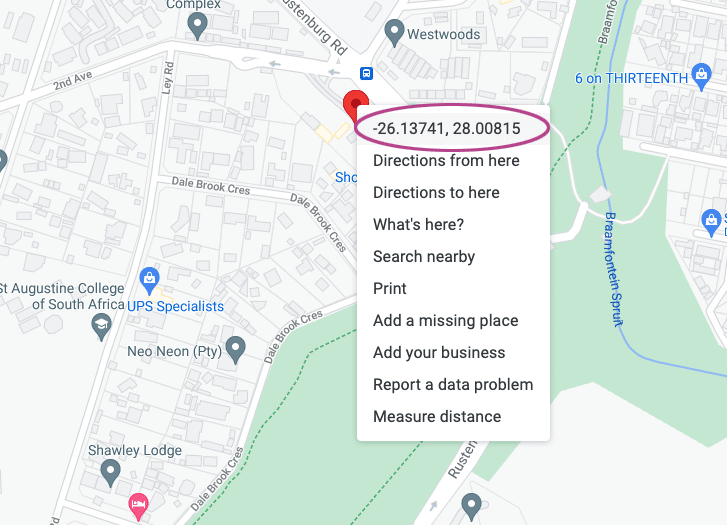
Η μορφή των συντεταγμένων των Χαρτών Google θα πρέπει να μοιάζει με αυτή: -26.13741, 28.00815
Εάν είναι απαραίτητο, μπορείτε να μετατρέψετε σε αυτή τη μορφή χρησιμοποιώντας το ακόλουθο εργαλείο:
http://www.gps-coordinates.net/gps-coordinates-converter
Ορισμός των σωστών συντεταγμένων GPS:
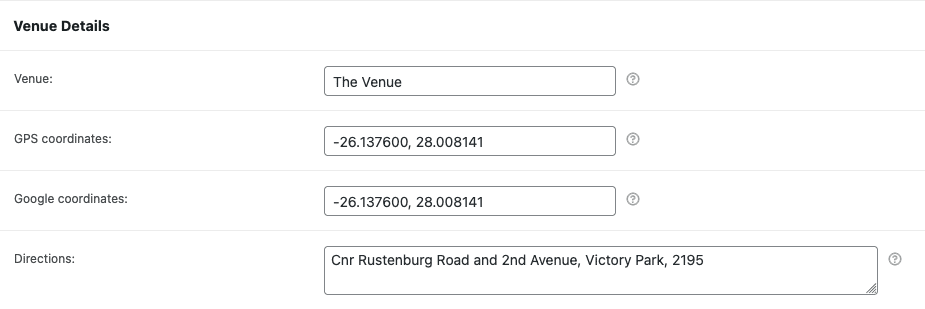
- Πλοηγηθείτε σε ένα προϊόν που έχει ενεργοποιήσει τα συμβάντα.
- Μετακινηθείτε προς τα κάτω στο Δεδομένα προϊόντος καρτέλες.
- Ανοίξτε το Ρυθμίσεις συμβάντος και μετακινηθείτε στην καρτέλα Λεπτομέρειες χώρου τμήμα.
- Εισάγετε το Συντεταγμένες GPS στο Συντεταγμένες Google Map πεδίο.
Προβολή του χάρτη Google:
Πλοηγηθείτε στο προϊόν στο μπροστινό μέρος του ιστότοπού σας και μετακινηθείτε στις καρτέλες προϊόντων: