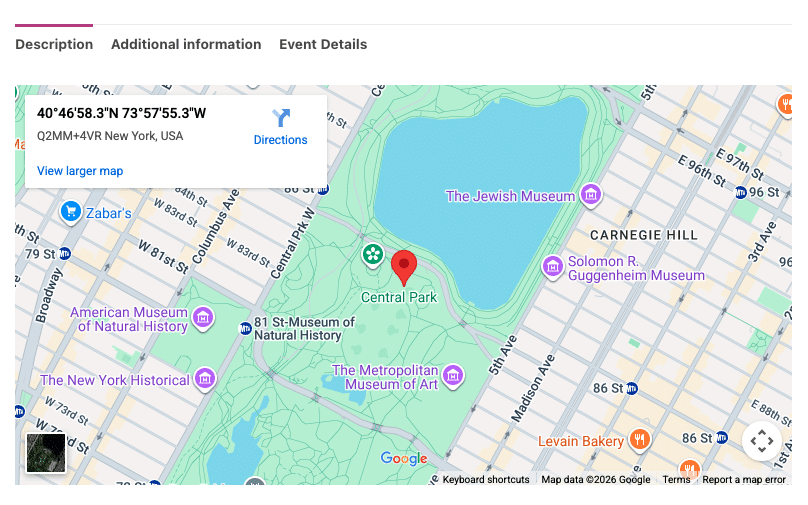

FooEvents umožňuje zobrazovat mapy na vašich událostech/produktech pomocí Map Google. Můžete si vybrat ze dvou způsobů vkládání map.
Výběr metody vkládání:
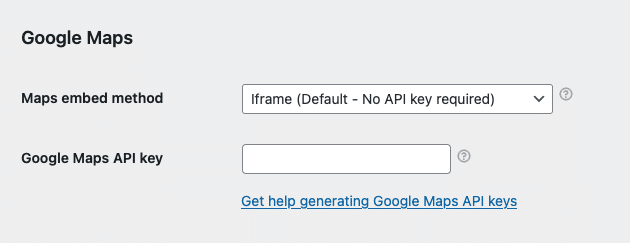
- Přejděte na FooEvents > Nastavení > Integrace > Mapy Google
- Vyberte si Metoda vkládání map:
- Iframe - zdarma a nevyžaduje klíč Google Maps API - doporučené
- JavaScript - vyžaduje placený klíč Google Maps API - starší možnost; vyhnout se
Metoda 1: Iframe - doporučeno
Metoda iframe je jednoduchá, bezplatná a snadno se nastavuje. Stačí vybrat metodu iframe a při úpravách událostí zadat GPS souřadnice místa konání (viz níže).
Metoda 2: JavaScript - placená starší varianta; vyhněte se jí
Metoda JavaScript je starší možností, která byla k dispozici před zavedením metody iframe. Vyžaduje nastavení placeného klíče Google Maps API. Je také náchylnější ke konfliktům JavaScriptu s motivy a pluginy třetích stran. Z tohoto důvodu doporučujeme používat možnost iframe, protože je robustnější a poskytuje podobné funkce.
Pokud se rozhodnete použít metodu JavaScript, budete muset vygenerovat klíč Google Maps API. Postupujte podle těchto pokynů:
- Můžete vygenerovat Klíč Google Maps API podle těchto pokynů: https://developers.google.com/maps/documentation/javascript/get-api-key
- Po vygenerování Klíč Google Maps API, zadejte ji zde: FooEvents > Nastavení > Integrace > Klíč Google Maps API
Získání správných souřadnic GPS:
Následující pokyny platí pro metody vložení iframe i JavaScript.
Přejít na maps.google.com a vyhledejte místo konání nebo adresu. Po nalezení klikněte pravým tlačítkem myši na místo, klikněte na souřadnice a zkopírujte je do schránky. Vložte je do pole “Souřadnice na mapě Google" při úpravách události v Oblast administrace WordPress.
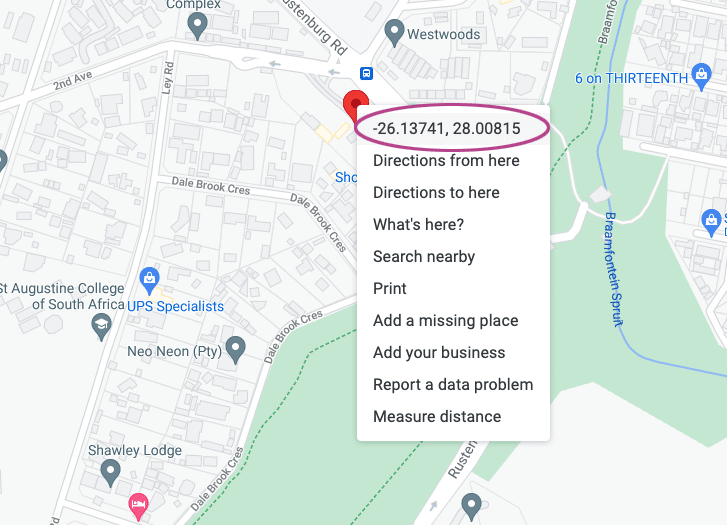
Formát souřadnic v Mapách Google by měl vypadat takto: -26.13741, 28.00815
V případě potřeby můžete do tohoto formátu převést pomocí následujícího nástroje:
http://www.gps-coordinates.net/gps-coordinates-converter
Nastavení správných souřadnic GPS:
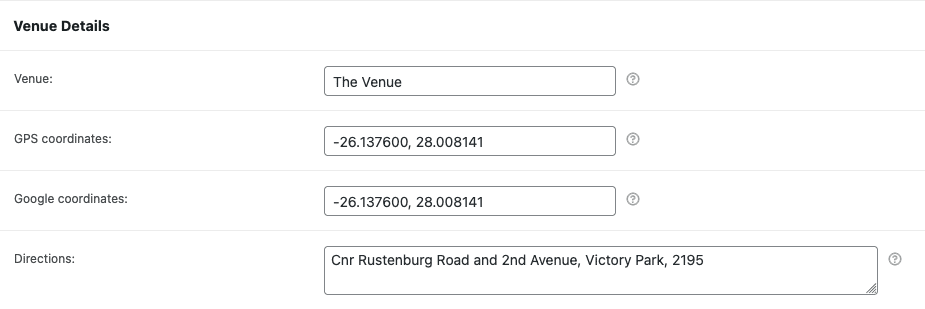
- Přejděte na produkt, který má povoleny události.
- Přejděte dolů na Údaje o produktu karty.
- Otevřete Nastavení události a přejděte na kartu Podrobnosti o místě konání sekce.
- Zadejte Souřadnice GPS v Souřadnice na mapě Google pole.
Zobrazení mapy Google:
Přejděte na produkt na přední straně webu a přejděte na karty produktu: