
The FooEvents Attendee Listing block displays a list of attendees for an event product. Depending on the selected layout, it can show attendee names, profile images, company details, designations, contact information, and the total number of attendees.
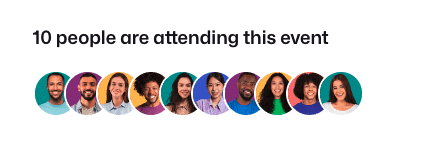
In most cases, the easiest way to add this block is through the WordPress block editor. However, there may be situations where the block editor is not available, or where you need to add the attendee listing inside another content field, such as a WooCommerce product short description, custom template field, or another HTML-capable text area.
In those cases, you can embed the block manually using WordPress block comment syntax. This lets WordPress render the FooEvents Attendee Listing block in supported content areas, provided the field preserves HTML comments and the content is processed using WordPress block rendering.
1. Block HTML syntax
Use this exact block name:
<!-- wp:woocommerce-events/fooevents-event-attendees /-->
You can also include block attributes:
<!-- wp:woocommerce-events/fooevents-event-attendees {"layout":"pictures","sortAttendeeBy":"createdate","uniqueAttendees":false} /-->
Important:
- This is WordPress block comment syntax. It is often pasted into HTML-capable fields, but it is not a normal HTML element.
- Attribute JSON must be valid. Use double quotes around keys and string values.
2. Where you can add it
You can place this block anywhere your site renders block markup using do_blocks, for example:
- Page or post content
- Template content areas
- HTML-capable content fields that preserve block comments
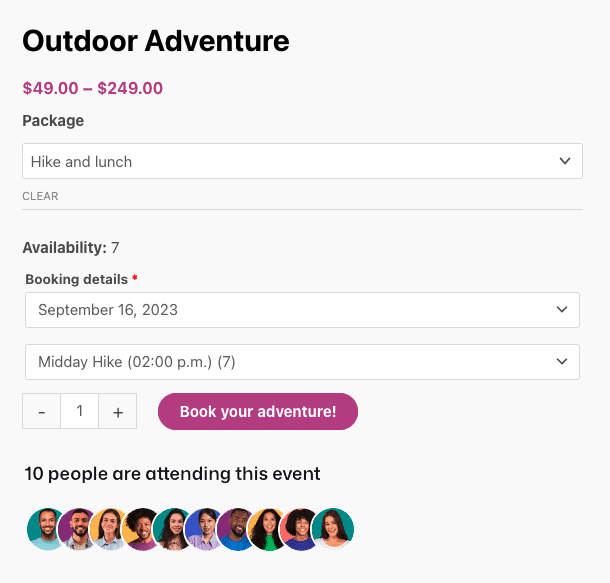
If the field strips HTML comments or does not render blocks, the block will not render.
3. Product ID behavior
- On a single product page, the block automatically uses the current product ID.
- In this case,
productIDsis optional. - Outside a product page, you must set
productIDsto one or more event product IDs, otherwise no attendees will be found.
Note: On product pages, if you also set productIDs, the current product is added to that list.
4. Attribute reference
| Attribute | Type | Default | Accepted values | What it does |
|---|---|---|---|---|
productIDs | array | [] | Array of product IDs | Filters attendees by event product ID. |
layout | string | "grid" | "grid", "pictures", "list" | Selects the output layout. |
sortAttendeeBy | string | "firstname" | "firstname", "lastname", "createdate", "rand" | Sets the attendee sort key. |
sortAttendeeOrder | string | "asc" | "asc", "desc" | Sets the sort order. This is ignored when using "rand". |
uniqueAttendees | boolean | true | true, false | Removes duplicate attendees by full name. |
limitNumAttendees | boolean | false | true, false | Enables an attendee count limit. |
numberOfAttendees | number | 20 | Integer. The UI allows 2 to 100. | Sets the number of attendees returned when the limit is enabled. |
enableShowName | boolean | true | true, false | Shows the attendee name in grid and list layouts. |
nameFormat | string | "full_name" | "full_name", "first_name", "first_name_initial", "last_name", "initial_last_name" | Controls how attendee names are displayed. |
enableShowGravatar | boolean | true | true, false | Shows the avatar image. |
enableShowEmail | boolean | false | true, false | Shows the attendee email address in grid and list layouts. |
enableShowPhone | boolean | false | true, false | Shows the attendee phone number in grid and list layouts. |
enableShowDesignation | boolean | true | true, false | Shows the attendee designation in grid and list layouts. |
enableShowCompany | boolean | true | true, false | Shows the attendee company in grid and list layouts. |
enableTotalAttendees | boolean | true | true, false | Shows the total attendee count text. |
profilePictureSize | string | "small" | "small", "medium", "large" | Sets the avatar image size. |
numberOfGridItems | number | 4 | Integer. The UI allows 2 to 8. | Sets the number of columns per row in the grid layout. |
enableShowMore | boolean | true | true, false | Currently defined, but not used by the render templates in this version. |
5. Copy/paste examples
A. Product page only: auto product ID
<!-- wp:woocommerce-events/fooevents-event-attendees {"layout":"pictures","sortAttendeeBy":"createdate","sortAttendeeOrder":"desc","uniqueAttendees":false} /-->
B. Anywhere on site: explicit product IDs
<!-- wp:woocommerce-events/fooevents-event-attendees {"productIDs":[123,456],"layout":"grid","numberOfGridItems":4,"enableShowEmail":false} /-->
C. List layout with custom visibility
<!-- wp:woocommerce-events/fooevents-event-attendees {"layout":"list","enableShowGravatar":true,"enableShowName":true,"nameFormat":"first_name_initial","enableShowCompany":true,"enableShowDesignation":true,"enableShowPhone":false,"enableShowEmail":false} /-->
 English
  German
  Dutch
Dutch  Spanish
  Italian
  Portuguese
  French
  Polish
  Czech
Czech  Greek
Greek